GamePad download for android 13 (Tiramisu)
APK file GamePad 1.7 compatible with Android 13How to install APK / APKS / OBB file on Android
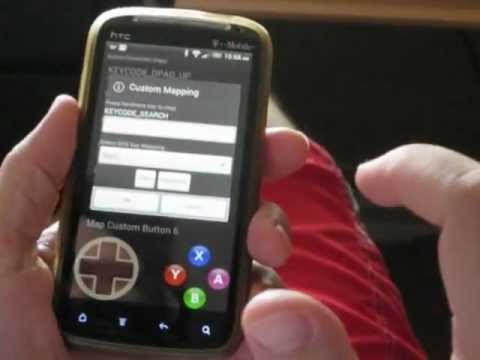

The only 100% FREE Gamepad keyboard for playing games. Emulates a simple D-Dpad directional keys / Cursor Keyboard Keys, and four (or six) separate buttons.
Emulate a Game Controller on your phone. Designed for use with DosBox Turbo, but works with other Android emulators, OnLive, SplashTop and any Android game/app that can use a Keyboard (utilizes the standard Android Input Method Framework).
Features:
=========
★ True 8-Way or emulated 8-Way Directional Pad
★ Permanent Notification Setting to allow use in any App/Game
★ Custom Mappable 8-way DPad
★ 4 or 6 extra mappable buttons + directional pad
★ DosBox Turbo / Xbox360 mode Controller emulation
★ ESC and Function Keys (F1-F12)
★ Re-Map A,B,X,Y,C,Z buttons to Different Keys
★ Multi-Touch capable (depends on phone hardware)
★ Built in Transparent Keyboard
★ Uses standard Android Input Method (IME)
★ Configurable Transparency Levels
★ Swipe Left/Right to switch from Keyboard to GamePad
★ Swipe Down for Settings
★ Configurable Swipe Gestures
To Use:
=======
After installation, Enable "Game Pad" in the Android Settings->Keyboards section.
Choose "Game Pad" as the Input Method.
** NOTE: If the game/app does not SUPPORT using Standard Android Input Method (ie. Keyboard) as an input method, then go into the settings menu and enable "Permanent Notification". Launch Gamepad Keyboard once to start the notification. Then start your game and drag down the notification area. By clicking on notification icon, Gamepad Keyboard will be displayed.
Add option for Keypress Previews
Fix permanent notification bugs.
Add border around QWERTY keys for better differentiation.
Change minimum required Android version to 4.0 (Ice Cream Sandwich).
- LicenseFree
- File nameGamePad
- File Version1.7
- Package namecom.fishstix.gameboard
- Size1.13 MB
- UploadedSeptember 20, 2018
- Android4.0 or later
- CategoryTools
- DeveloperFishstix
- Developer site
- Developer emailandroid.fishstix@gmail.com
- md5 hashd43b8b8a446bc11d9e42799bf1af1bfd
- Architecture-
- Permissionsshow (3)